What is the Eisenhower Matrix
The Eisenhower Matrix is an organizing method that splits your tasks into four groups, crossing two criteria: how urgent a task is (it needs an immediate response) and how important it is (it actually affects your goals, even without a tight deadline). The name comes from U.S. general and former president Dwight Eisenhower, known for handling a huge volume of decisions in short time — the method was popularized decades later by Stephen Covey.
The matrix is useful for a simple reason: our brains tend to treat anything that feels urgent as a priority, even when it doesn't really matter — and put off what's truly important just because it has no tight deadline yet. Separating these two questions helps you see that clearly.
Recommended reading
As an Amazon Associate, we may earn a commission from qualifying purchases made through these links, at no extra cost to you.
How to use the matrix
- Dump everything into the task inbox first, without worrying about organizing yet. The goal here is just to get it out of your head.
- For each task, ask two questions: "does this need to happen soon?" (urgency) and "does this actually affect my goals?" (importance).
- Move each task to the right quadrant by selecting the card and tapping "Move here" — you can select several at once — or by dragging it directly (on computer screens).
- Work in order: start with "Do now", set aside fixed time for "Schedule" (it's the one most often neglected), hand off what you can in "Delegate", and cut without mercy whatever lands in "Delete".
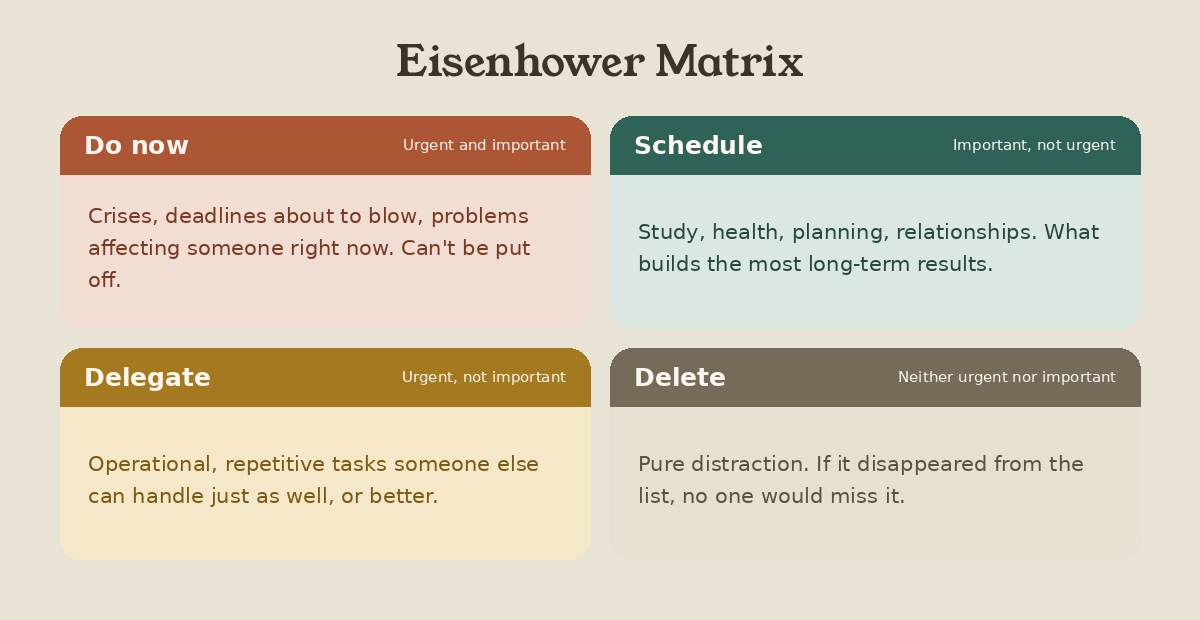
What each quadrant means
Frequently asked questions
Do I need to create an account to use it?
No. The tool works as soon as you open the page, no sign-up or login required. Your tasks are saved automatically in the browser you're using — if you clear your browser data or switch devices, they won't carry over.
What's the difference between urgent and important?
Urgent is about time: it's what demands immediate action, usually because of a deadline or an imminent consequence. Important is about impact: it's what contributes to your goals, even if it doesn't need to happen today. A task can be both, either, or neither — and that's where the four quadrants come in.
How many tasks should I put in each quadrant?
There's no fixed number, but here's something to watch for: if "Do now" is always packed, it's a sign that "Schedule" tasks are being put off until they turn into emergencies. Reviewing the matrix regularly helps you catch that pattern before it snowballs.
Can I use this alongside other techniques, like Pomodoro or Kanban?
Yes, they solve different problems and complement each other well. The Eisenhower Matrix helps you decide what to prioritize; techniques like Kanban help you track the progress of what's already been decided; and Pomodoro helps you stay focused while you execute.
Can I use this for work and personal tasks at the same time?
You can, but many people prefer to keep a separate matrix for each area of life, since what counts as "important" changes quite a bit between contexts. It's up to you — the tool doesn't force either approach.